FiveM Scripts
Panther ARS — Advanced Radar & Recognition System
Panther ARS is a modern, immersive traffic-enforcement suite for FiveM, combining advanced dual-antenna police radar, automatic license plate recognition, vehicle targeting, traffic-stop documentation, and optional ERS / Night Shifts MDT integration into one cohesive system.
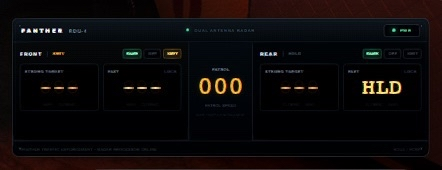
Designed to feel like actual equipment installed inside a modern patrol vehicle, Panther ARS replaces the traditional oversized FiveM radar HUD with a purpose-built RDU-4 digital control system, featuring realistic operating states, front and rear radar antennas, target locking, fast-target detection, ALPR functionality, equipment-style controls, and a fully redesigned modern interface.
Whether your community runs dedicated traffic units, highway patrol, city police, sheriff operations, or general law-enforcement roleplay, Panther ARS gives officers a significantly more immersive way to conduct speed enforcement and document traffic stops.
Advanced Dual-Antenna Radar
Panther ARS features independent front and rear radar antennas, allowing officers to monitor traffic in multiple directions while maintaining full control over each antenna.
Each antenna supports:
Front and rear radar operation
Independent XMIT / HOLD states
SAME-direction traffic
OPPOSITE-direction traffic
Simultaneous SAME + OPP operation
Strong target detection
Fast target detection
Target direction indicators
Patrol vehicle speed
Individual antenna locking
Target lock / release
Configurable radar behavior
Moving radar operation
Panther distinguishes between the strongest radar return and a qualifying fast target, allowing officers to identify faster vehicles even when another vehicle produces the dominant radar return.
This produces significantly more realistic traffic-enforcement scenarios than basic nearest-vehicle speed scripts.
Panther RDU-4 Interface
Panther ARS includes a completely redesigned RDU-4 Radar Display and Control Head built specifically for Panther.
The interface is designed to resemble modern in-vehicle law-enforcement electronics rather than a traditional game HUD.
The RDU-4 includes:
Compact equipment-style radar head
Dedicated front and rear antenna sections
Amber digital radar readouts
Patrol speed display
SAME / OPP indicators
XMIT / HOLD indicators
Target-lock indicators
Front / rear antenna status
Equipment-style LED indicators
Power state feedback
System self-test / startup sequence
Radar lock animations
Dynamic status illumination
Modern OEM-inspired control head
The radar display can also be repositioned and configured by the individual officer.
Panther Control Head
Officers can operate the entire system through the dedicated Panther control interface.
Controls include:
System Power
Radar Display
ALPR Display
Front SAME mode
Front OPP mode
Front XMIT / HOLD
Front Lock / Release
Rear SAME mode
Rear OPP mode
Rear XMIT / HOLD
Rear Lock / Release
Operator Menu
Display Setup
Quick Guide
Important functions can also be assigned through FiveM's native key-mapping system, allowing every officer to configure their preferred controls.
Integrated ALPR System
Panther ARS also includes an integrated Automatic License Plate Recognition system.
The ALPR operates independently from the radar and continuously monitors vehicles passing through the front and rear camera zones.
Features include:
Front ALPR camera
Rear ALPR camera
Automatic plate scanning
Real GTA license plate backgrounds
Front plate locking
Rear plate locking
Plate acquisition animations
Lock / release functionality
BOLO plate configuration
Automatic BOLO alerts
Distinct critical-hit indicators
Integrated audio alerts
Radar and ALPR do not need to be operating together, allowing officers to use the plate-reader independently when appropriate.
Traffic Stop Recorder
When used alongside Emergency Response Simulator (ERS), Panther ARS becomes much more than a radar system.
Panther can automatically create and maintain a traffic-stop record when an ERS pullover begins.
A stop record can contain information such as:
Stop ID
Officer
Callsign
Department
Start time
End time
Vehicle plate
Vehicle information
Driver information
Radar evidence
Stop status
Pursuit status
Traffic-stop timeline
This creates a continuous record beginning with the officer's initial observation and continuing throughout the traffic stop.
Automatic Radar Evidence Linking
Radar locks can automatically be associated with the vehicle involved in an ERS traffic stop.
For example:
Radar Observation
Front Fast Target
94 MPH
TX ABC1234
followed by:
ERS Traffic Stop
TX ABC1234
can become one linked traffic-enforcement record.
Radar evidence may include:
Target speed
Patrol speed
Front / rear antenna
Target direction
Strong / fast target type
Plate
Radar lock information
This allows officers to retain the original radar measurement even after the vehicle has slowed down for the traffic stop.
Night Shifts MDT Integration
Panther ARS supports integration with Night Shifts MDT when used alongside ERS.
During an ERS traffic stop, Panther can receive the Night Shifts-backed vehicle information returned by ERS.
Depending on your Night Shifts configuration, information can include:
License plate
Vehicle make
Vehicle model
Vehicle year
Vehicle color
Registered owner
Registration / tax status
Inspection / MOT status
Insurance status
Stolen vehicle status
BOLO information
The information is displayed directly inside the Panther Traffic Stop interface.
Driver Record Integration
Once the officer interacts with the vehicle's driver, Panther can also associate the driver's ERS / Night Shifts identity with the active stop.
Supported information may include:
Driver name
Civilian identity
Licenses
Flags / markers
Police records
This allows Panther to act as a companion traffic-enforcement interface while Night Shifts remains the authoritative records system.
ERS Pursuit Integration
If a traffic stop transitions into a pursuit, Panther can maintain the same traffic-stop record rather than treating the pursuit as an unrelated incident.
Example timeline:
Radar Target Detected
↓
Radar Locked
↓
Traffic Stop Initiated
↓
Vehicle Record Returned
↓
Driver Identified
↓
Driver Flees
↓
ERS Pursuit Started
↓
Pursuit Ended
↓
Traffic Stop Closed
This creates much more cohesive traffic-enforcement roleplay.
Optional Persistent Stop Records
When oxmysql is installed, Panther ARS can store traffic-stop records in MySQL.
Records can contain:
Stop identifier
Officer information
Department
Plate
Vehicle data
Driver data
Radar evidence
Stop timeline
Start / end times
Current stop status
If oxmysql is unavailable, the radar and ALPR systems can still operate independently.
Passenger Synchronization
Panther retains synchronized radar behavior for supported multi-officer vehicle operation.
This allows officers sharing the same patrol vehicle to observe synchronized radar equipment states rather than each client operating an unrelated radar instance.
This is ideal for:
FTO units
Two-officer patrol units
Traffic enforcement teams
Supervisor ride-alongs
Vehicle-Based Radar Operation
Panther ARS is designed primarily for law-enforcement and emergency vehicles.
The radar automatically handles equipment visibility when officers enter or leave an eligible vehicle.
For example:
Enter Patrol Vehicle
↓
Open Panther
↓
Enable Radar Display
↓
Operate Radar
↓
Exit Vehicle
↓
Radar Automatically Hides
The system remembers the officer's configured display state while preventing the radar interface from permanently remaining on-screen.
Performance-Oriented Design
The radar engine uses a mature vehicle-targeting system designed specifically for FiveM radar operation.
Features include:
Vehicle-pool caching
Dynamic radar scanning
Front / rear target filtering
Vehicle-heading checks
Radar antenna sensitivity
Vehicle-size calculations
Optimized target selection
Client-side radar processing
Event-based synchronization
This provides significantly more sophisticated targeting than scripts that simply check the nearest vehicle every frame.
Configurable
Panther ARS includes configuration options for areas such as:
Radar behavior
Antenna sensitivity
Fast-target settings
Vehicle eligibility
ALPR behavior
ERS integration
Night Shifts integration
Traffic-stop recording
MySQL persistence
UI behavior
Audio
Key mappings
Integrations
Supported
Standalone Radar / ALPR
No framework required for basic radar operation
Emergency Response Simulator
Traffic-stop integration
Vehicle interaction integration
Driver interaction integration
Pursuit integration
Night Shifts MDT
Officer shift data
Vehicle information
Driver / civilian information
PNC integration data
oxmysql
Optional persistent traffic-stop records
Requirements
For basic radar and ALPR functionality:
FiveM / Cfx.re server
For optional persistent stop records:
oxmysql
For traffic-stop integration:
Emergency Response Simulator
For MDT-backed vehicle and civilian information:
Night Shifts MDT
ERS, Night Shifts MDT, and oxmysql are not required simply to use the core radar and ALPR system.
Perfect For
Panther ARS is ideal for:
Police departments
Highway patrol
State police
Sheriff's offices
Traffic enforcement divisions
Motor units
Dedicated traffic RP
Serious law-enforcement communities
ERS-based servers
Panther ARS
Radar shouldn't just tell you how fast the closest car is going.
It should feel like equipment.
Panther ARS combines sophisticated radar targeting, ALPR, traffic-stop documentation, ERS integration, and Night Shifts records into a unified traffic-enforcement platform designed specifically for modern FiveM law-enforcement roleplay.
Detect. Identify. Document.
Panther ARS — Advanced Radar & Recognition System.
Licensing Notice
Panther ARS contains radar/plate-reader functionality adapted from the MIT-licensed Wraith ARS 2X project by WolfKnight. Applicable original copyright and MIT license notices are included with the resource.
The Panther interface, branding, traffic-stop recorder, ERS/Night Shifts integration layer, evidence workflow, and Panther-specific functionality are custom additions.
PC Parks Preorder
The Ultimate Amusement Park System for FiveM
Build. Manage. Operate. Experience.
PC Parks isn't being built as another simple FiveM ride script.
It is being developed as a complete amusement park framework and creation platform for FiveM, designed to transform amusement parks, waterparks, boardwalks, fairs, resorts, and entertainment districts into fully interactive multiplayer experiences.
From advanced roller coasters and water slides to queues, ride operations, maintenance, dynamic signage, park admission, attraction control systems and an ambitious Park Creator, PC Parks is being designed around one goal:
Give FiveM servers the tools to create and operate amusement parks at a level of depth that hasn't traditionally existed on the platform.
This package is a PRE-ORDER and grants access to PC Parks when eligible builds/releases are made available under the terms listed for the product.
🎢 More Than a Ride Script
Most amusement park resources focus on making an attraction move.
PC Parks is being designed around the entire experience surrounding the attraction.
An attraction can potentially have its own:
- Ride controller
- Vehicles
- Seats
- Restraints
- Queue
- Loading platform
- Operator controls
- Dispatch sequence
- Status
- Wait time
- Signage
- Audio
- Lighting
- Effects
- Maintenance state
- Operating mode
- Statistics
- Guest interactions
Instead of scripting every attraction as an isolated feature, PC Parks is being developed as a modular ecosystem where these systems can communicate with each other.
🏗️ PC Park Creator
One of the biggest planned components of PC Parks is the PC Park Creator.
The goal is to allow server developers to create sophisticated amusement park experiences without manually writing an entirely new Lua resource for every attraction.
The creator is planned to provide tools for configuring and managing components such as:
- Parks
- Park boundaries
- Attractions
- Ride paths
- Water-slide paths
- Stations
- Vehicles
- Seats
- Queues
- Boarding areas
- Exit areas
- Operator consoles
- Dynamic signs
- Audio zones
- Lighting
- Effects
- Cameras
- Triggers
- Maintenance components
- Show elements
- Attraction operating parameters
PC Parks is being designed as a platform, not merely a collection of hard-coded rides.
🎢 Advanced Attraction Framework
PC Parks is planned to support multiple categories of attractions through a common underlying architecture.
Roller Coasters
The coaster framework is being designed around features such as:
- Spline/path-based train movement
- Multiple trains
- Multiple cars per train
- Individual seating positions
- Custom ride vehicles
- Animated restraints
- Station operation
- Loading and unloading
- Dispatch logic
- Lift hills
- Launch sections
- Brake sections
- Block-based operation
- Multiple operating modes
- On-ride cameras
- Ride audio
- Ride effects
- Attraction-specific configuration
The objective is to make coaster operation feel like an actual attraction instead of simply teleporting a player onto a moving object.
🎡 Flat Ride Framework
PC Parks is also being designed for configurable flat rides.
Potential attraction types include:
- Ferris wheels
- Carousels
- Drop towers
- Pendulum rides
- Swing rides
- Spinning rides
- Bumper cars
- Observation rides
- Custom rotating attractions
- Custom scripted attraction types
The architecture is intended to allow custom models and motion configurations to be incorporated into the ecosystem.
🌊 Advanced Waterpark System
Waterparks are a major part of PC Parks rather than an afterthought.
The system is being designed around support for experiences including:
- Body slides
- Single-rider tube slides
- Multi-rider tube slides
- Family raft slides
- Racing slides
- Racing mats
- Drop capsules
- Funnels
- Bowls
- Wall rides
- Splashdown sections
- Lazy-river concepts
- Water attraction effects
Different slide types can use different rider behavior instead of every slide using the same generic movement system.
🛟 Body Slide System
Body slides are planned to have their own rider system.
Rather than attaching an invisible vehicle to the player, the system can support purpose-built riding behavior including:
- Slide-specific player positioning
- Custom riding animations
- Turning animations
- Drop animations
- Splashdown behavior
- Dynamic speed
- Path-following logic
- Water audio
- Water particle effects
- Collision management
- Entry and exit sequences
🛟 Interactive Tubes & Rafts
PC Parks is being designed around actual configurable ride vehicles for water attractions.
Supported vehicle concepts include:
- Single tubes
- Double tubes
- Family rafts
- Large multi-person rafts
- Racing mats
Ride vehicles can contain predefined seating and effect locations so compatible custom models can integrate directly with PC Parks.
👥 Multiplayer Water Slides
Multi-person slides are intended to actually support multiple players sharing the same ride vehicle.
A double tube can carry two players.
A family raft can carry a complete group.
The system is being designed to manage:
- Rider assignments
- Seating positions
- Group loading
- Network synchronization
- Ride sessions
- Disconnect cleanup
- Splashdown
- Vehicle recovery
This creates genuinely multiplayer attractions instead of every player experiencing the park independently.
🔄 Tube Management & Return Systems
PC Parks is planned to take waterpark immersion considerably further with configurable tube management.
Attractions can potentially track tubes as resources:
Available → Taken → In Use → Returned → Available
This opens the door to features such as:
- Physical tube racks
- Tube inventories
- Tube collection areas
- Return systems
- Tube shortages
- Attraction delays
- Visible rack inventory
- Different tube types
A ride can potentially be delayed because there are no available tubes rather than simply spawning an unlimited number out of nowhere.
🚦 Water Slide Dispatch Systems
Water attractions can use configurable dispatch systems.
Features are planned around:
- Red/green slide signals
- Rider detection
- Slide-clear detection
- Automatic dispatch
- Manual attendant operation
- Dispatch intervals
- Multiplayer raft readiness
- Attraction shutdown
- Queue integration
Drop slides can additionally support configurable capsule sequences.
💧 Drop Capsule System
Compatible custom capsule models can be configured with:
- Animated doors
- Animated trapdoors
- Rider positioning
- Countdown sequences
- Status lights
- Dispatch audio
- Water effects
- Automatic reset sequences
Giving servers the ability to create much more convincing high-thrill water attractions.
🚶 Advanced Queue System
PC Parks is being designed around actual attraction queues instead of simple interaction markers.
Potential queue types include:
- Standby
- Express
- Virtual Queue
- Single Rider
- Priority/VIP
Attractions can calculate and expose estimated wait times based on their operation.
👨👩👧 Group-Aware Boarding
Where supported, the seating system is intended to understand player groups.
The system can attempt to keep groups together when assigning seats rather than randomly splitting everyone across a ride vehicle.
Single-rider queues can potentially fill otherwise unused seats to increase attraction capacity.
🎟️ Admission & Ticketing
PC Parks is planned to include an optional park admission ecosystem.
Potential ticket types include:
- Single-day admission
- Multi-day admission
- Season passes
- VIP admission
- Express access
- Event tickets
- Complimentary admission
- Staff credentials
Servers that don't want an economy or admission system can configure the resource accordingly.
🎫 Waterpark Wristbands
Waterparks can optionally use virtual wristbands for functionality such as:
- Admission verification
- Express access
- Locker access
- Attraction reservations
- Ride-photo identification
- Guest services
🪧 Dynamic Digital Signage
Compatible PC Parks signs can use dynamic displays rather than permanently baked text.
Displays can potentially show:
ATTRACTION NAME
WAIT: 15 MINUTES
OPEN
And automatically change to:
TEMPORARILY CLOSED
when the attraction state changes.
🗺️ Dynamic Wayfinding
Park displays can provide live information for multiple attractions.
For example:
← TORNADO — 15 MIN
→ CYCLONE — 25 MIN
↑ FERRIS WHEEL — OPEN
If an attraction closes, connected signage can update automatically.
🖥️ Smart Park Displays
The display framework is planned for use with:
- Attraction entrance signs
- Wait-time boards
- Park maps
- Information kiosks
- Queue displays
- Boarding displays
- Operator displays
- Show schedules
- Park announcements
- Directional signage
Giving custom parks a modern connected infrastructure.
🎛️ Advanced Ride Operations
Supported attractions can operate through configurable state machines.
Example:
CLOSED → TESTING → OPEN → BOARDING → READY → DISPATCHED → UNLOADING
Rather than relying on one giant loop, PC Parks is being designed around individual attraction controllers and state changes.
👷 Operator Gameplay
Authorized players can potentially operate supported attractions manually.
Depending on the attraction, operators may control systems such as:
- Gates
- Restraints
- Dispatch
- Ride cycles
- Attraction mode
- Slide signals
- Tube dispatch
- Emergency stop
- Reset
- Attraction opening and closing
Automatic operation can remain available when a server doesn't have enough staff online.
🔧 Maintenance System
Maintenance is intended to be an actual gameplay role.
Attractions can track simulated information such as:
- Operating cycles
- Runtime
- Faults
- Inspections
- Maintenance status
- Component condition
Staff can potentially receive and complete work orders rather than fixing rides through an admin command.
📋 Work Orders
Maintenance tasks can use structured work orders with statuses such as:
OPEN
ASSIGNED
IN PROGRESS
AWAITING TEST
COMPLETE
This gives amusement-park RP servers an entirely new category of staff gameplay.
☀️ Opening Procedures
Attractions can optionally require opening procedures before entering service.
Depending on configuration, this can include:
- Visual checks
- System checks
- Restraint checks
- Empty test cycles
- Operator confirmation
- Maintenance clearance
Once completed, the attraction becomes available to guests.
🌙 Closing Procedures
Closing an attraction doesn't have to instantly delete everything.
PC Parks can support sequences where:
- Queue entry closes
- Remaining guests are processed
- Final ride cycle runs
- Vehicles return
- Guests unload
- Attraction enters closed mode
- Lighting changes
- Systems shut down
🔊 Advanced Park Audio
PC Parks is being designed with multiple categories of positional audio in mind.
Potential channels include:
- Park music
- Attraction music
- Queue music
- Mechanical sounds
- Ride vehicle audio
- Water audio
- Effects
- Public-address announcements
Audio can be associated with specific park areas or attractions.
📢 Public Address System
Park-wide and attraction-specific announcements can be supported.
Examples include:
- Park opening
- Park closing
- Attraction delays
- Attraction reopening
- Weather notices
- Event reminders
- Show announcements
Attraction announcements can remain localized instead of playing across the entire map.
🎵 Synchronized Attraction Audio
Advanced attractions can associate audio cues with ride progression.
This allows custom experiences where:
- Music changes
- Effects activate
- Lighting changes
- Audio cues trigger
at specific points during an attraction.
💡 Attraction Lighting
PC Parks is being designed to support attraction lighting states including:
- Day
- Evening
- Night
- Show
- Closed
- Fault
- Evacuation
Compatible custom assets can use emissive materials and other effects to create dramatically different nighttime experiences.
🎬 Show Control
The long-term PC Parks architecture is also being designed with timed entertainment systems in mind.
The same underlying cue system can potentially operate:
- Dark rides
- Stage shows
- Fountain shows
- Lighting sequences
- Special effects
- Seasonal attractions
- Haunted attractions
- Fireworks sequences
📸 Ride Cameras
Supported attractions can define camera locations for experiences such as:
- Ride photos
- POV cameras
- Front-row cameras
- Rear cameras
- Cinematic views
This infrastructure can later be used for advanced ride-photo and replay functionality.
📱 Park Interface
PC Parks is planned to include a modern guest-facing interface for accessing information such as:
- Attractions
- Wait times
- Attraction status
- Park maps
- Tickets
- Virtual queues
- Shows
- Ride information
- Favorites
- Guest progression
🏆 Park Progression
Optional progression systems are planned around park experiences rather than generic XP grinding.
Potential features include:
- Achievements
- Attraction passports
- Collectibles
- Challenges
- Ride milestones
- Waterpark completion
- Leaderboards
Servers can disable these systems if they want a purely realistic RP experience.
🏁 Racing & Competitive Attractions
PC Parks is being designed with competitive attractions in mind.
Examples include:
- Mat racing slides
- Racing water slides
- Dueling attractions
- Bumper cars
- Midway games
Allowing servers to build attractions with actual results and leaderboards.
🎃 Seasonal Events
Park configurations can eventually support seasonal overlays.
Examples:
- Halloween
- Christmas
- Summer Nights
- Anniversary events
- Server-specific events
Event configurations can alter:
- Signage
- Music
- Lighting
- Shows
- Attraction presentation
- Operating hours
- Effects
without replacing the entire park configuration.
🧰 Asset SDK
PC Parks is being developed around standardized custom assets.
Compatible models can expose predefined locations such as:
seat_01
seat_02
restraint_01
restraint_02
camera_pov
fx_front
fx_rear
audio_origin
This is intended to allow model developers to build custom PC Parks-compatible attraction assets.
🔌 Developer API
PC Parks is planned to expose events and exports so other FiveM resources can integrate with park systems.
Potential integrations include:
- Economy frameworks
- Inventory systems
- CAD/dispatch
- Door systems
- Radio systems
- Weather resources
- Staff systems
- Custom UI
- Third-party attraction packages
The core architecture is being designed with standalone operation first, with integrations layered around it.
⚙️ Performance First
A system this large cannot simply run every feature every frame.
PC Parks is being designed around concepts including:
- Distance-based processing
- Event-driven attraction states
- Entity streaming
- Client-side presentation
- Server-authoritative important state
- Configurable update intervals
- LOD-aware effects
- Park-based streaming
- Reduced processing for distant attractions
A player at one park should not need to fully simulate another park miles away.
🩺 Built-In Diagnostics
Development tooling is planned to help server owners identify improperly configured attractions and custom assets.
Potential diagnostic systems include:
- Missing model detection
- Missing bone detection
- Invalid attraction paths
- Invalid seats
- Invalid effects
- Configuration validation
- Performance information
- Resource health information
🛠️ Built for Developers
PC Parks is being designed for people who want to build things.
Not only people who want to install a premade roller coaster.
The long-term goal is to make it possible for creators to combine:
PC Parks + custom models + custom maps + custom configurations
to create experiences completely different from the parks used during development.
🌎 Built for More Than One Park
Although PC Parks is being developed and tested around large amusement-park and waterpark environments, the underlying framework is intended to be reusable.
Potential uses include:
- Theme parks
- Waterparks
- Boardwalks
- Piers
- Carnivals
- Fairs
- Resorts
- Indoor entertainment centers
- Seasonal events
- Custom FiveM maps
🚧 PRE-ORDER NOTICE
PC Parks is currently in active development.
This listing is a pre-order, not a representation that every planned feature described above is currently complete or immediately available.
Features, interfaces, systems, compatibility, implementation details, development priorities and release plans may change during development as PC Parks is tested and improved.
Pre-order customers are purchasing access according to the delivery and licensing terms shown on this listing.
Do not purchase this pre-order expecting every planned feature to be available immediately.
We would much rather be extremely clear about that now than create unrealistic expectations later.
What Your Pre-Order Supports
Your pre-order directly supports continued development of:
PC Parks Core
Park Creator
Attraction Framework
Waterpark Framework
Multiplayer Ride Systems
Operations
Maintenance
Dynamic Signage
Guest Systems
Developer Tools
and the larger ecosystem being built around PC Parks.
Early adopters will receive the product according to the applicable pre-order license and release terms.
PC PARKS
Build the park.
Operate the attractions.
Manage the experience.
Let your players live it.
PC Parks by Panther City Labs
The next generation of amusement park experiences for FiveM.
Starfire Vehicle Menu
Upgrade your FiveM server with a modern, powerful, and easy-to-use vehicle menu designed to make vehicle access faster, cleaner, and more organized.
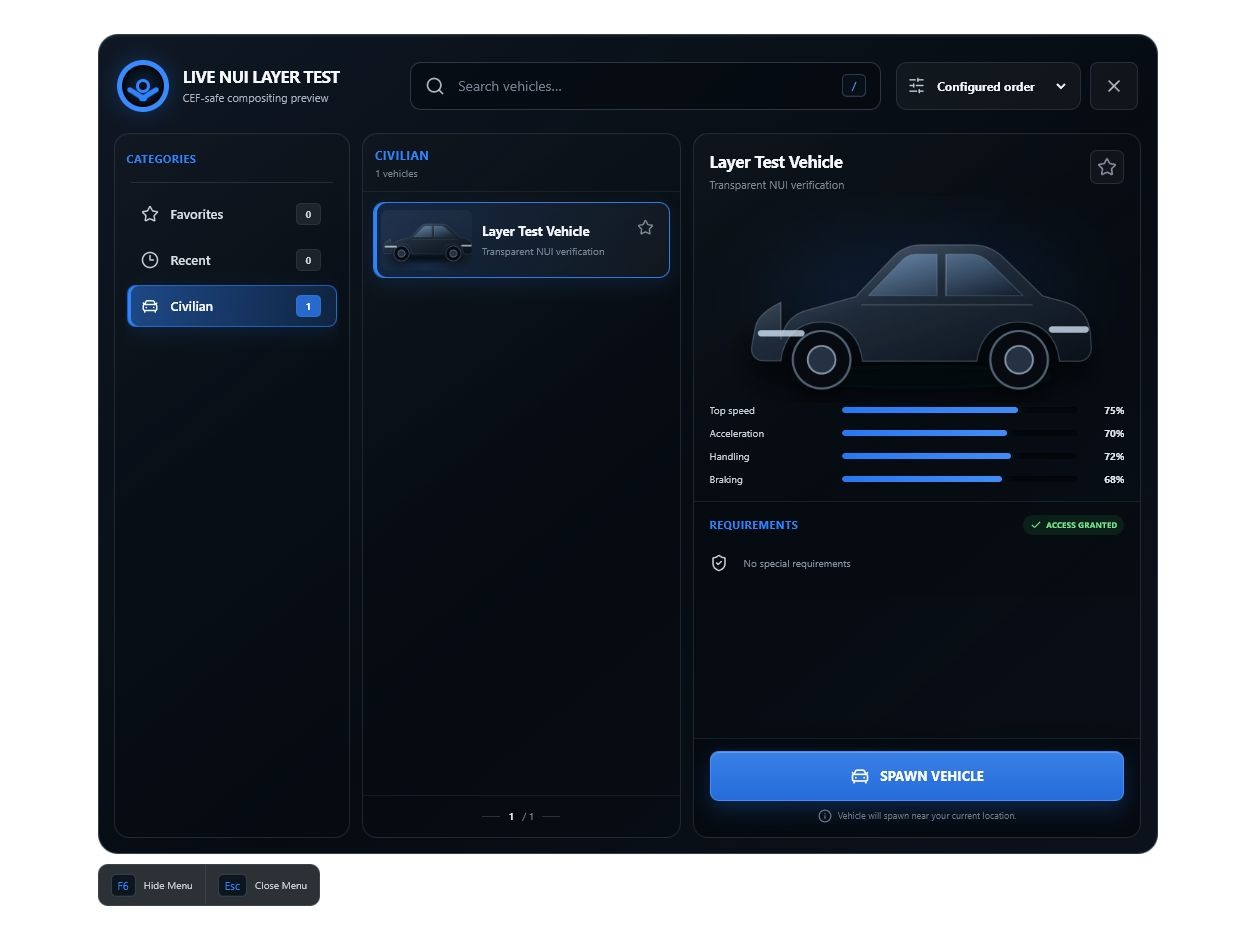
This custom vehicle menu features a sleek, responsive user interface that replaces outdated list-based menus with a polished experience built for modern FiveM servers. Players can quickly browse organized vehicle categories, search for specific vehicles, view detailed vehicle information, and spawn their selected vehicle with minimal effort.
Key Features
- Modern custom user interface
- Organized vehicle categories
- Fast vehicle search system
- Vehicle image previews
- Performance statistics and vehicle information
- Favorites system for frequently used vehicles
- Recently used vehicle history
- Job-based vehicle restrictions
- Permission and ACE-based access controls
- Support for department, role, and rank restrictions
- Clean and responsive design
- Easy configuration
- Optimized for smooth server performance
Whether you operate a roleplay community, emergency-services server, racing server, or custom framework, this vehicle menu provides a professional and user-friendly way to manage your server’s vehicle collection.
The menu can be configured to control which vehicles are available to specific jobs, departments, ranks, or permission groups, helping prevent unauthorized vehicle usage while keeping access simple for approved players.
Give your server a premium vehicle-selection experience with a menu that looks modern, performs smoothly, and keeps even large vehicle collections easy to navigate.
Starfire Vehicle Menu Source Code
Full Editable Source Code + Commercial Resale License
Build, customize, rebrand, expand, and commercially release your own FiveM vehicle-menu product using the complete source code behind the Starfire Vehicle Menu.
This package is designed for FiveM developers, development studios, asset creators, and Tebex sellers who want a professionally structured vehicle-menu foundation without having to build every system from scratch.
Unlike a standard single-server script license, this package includes access to the full editable source code. You can modify the interface, expand the functionality, connect the menu to your own systems, replace the branding, and use the project as the foundation for a separately branded and meaningfully modified commercial product.
Your purchase also includes a limited commercial license allowing you to resell your own modified version of the menu, subject to the licensing conditions included with the package.
What Is the Starfire Vehicle Menu?
The Starfire Vehicle Menu is a modern FiveM vehicle-selection system designed to give players a cleaner, faster, and more professional way to browse, preview, access, and spawn vehicles.
Instead of relying on outdated text lists or basic native menus, the Starfire Vehicle Menu provides a polished custom interface with:
- Organized vehicle categories
- Fast vehicle searching
- Vehicle preview images
- Performance statistics
- Favorites
- Recently used vehicles
- Job and rank restrictions
- ACE permission support
- Configurable spawning behavior
- Modern custom UI styling
The Source Code Edition gives developers access to the underlying project so they can build a distinct product on top of an established foundation.
You are not limited to editing a few configuration values. The included source allows you to modify the interface, client logic, server logic, permissions, storage, spawning behavior, framework integrations, vehicle data, branding, and overall product direction.
Complete Editable Source Code
This package includes the complete editable source code required to continue developing the Starfire Vehicle Menu.
The package may include:
- FiveM client-side Lua source
- FiveM server-side Lua source
- NUI frontend source
- HTML, CSS, JavaScript, TypeScript, or framework-based UI files
- Resource manifest
- Editable configuration files
- Vehicle category configuration
- Vehicle definition system
- Vehicle spawning logic
- Permission and access-control logic
- Search and sorting systems
- Favorites functionality
- Recent-vehicle history
- Interface assets
- Localization files
- Build configuration
- Installation documentation
- Development instructions
- Commercial license documentation
The delivered source files are intended to be editable by the purchaser.
No part of the package is intended to prevent legitimate development, customization, or modification permitted under the included license.
Commercial Resale Rights Included
This package includes a limited commercial license allowing the purchaser to create and sell a meaningfully modified version of the Starfire Vehicle Menu.
This gives developers the ability to use the source as a commercial foundation while still requiring the final product to contain substantial original work.
You may create a new product using the Starfire Vehicle Menu source code, provided that your release is not simply a renamed, recolored, or minimally edited copy of the original resource.
Permitted commercial use may include:
- Creating a separately branded vehicle menu
- Substantially redesigning the user interface
- Adding original features
- Creating framework-specific versions
- Connecting the resource to your own script ecosystem
- Adding garage integrations
- Adding dealership integrations
- Adding fleet-management functionality
- Adding database-backed access systems
- Adding custom permission systems
- Creating department-specific versions
- Building a larger vehicle-management product
- Selling your modified version through your own Tebex store
- Selling your modified version under your own business or development brand
- Including modified portions of the system inside a larger original resource
The resale license is intended for developers who plan to create a genuinely distinct commercial product.
It does not authorize direct redistribution of the original Starfire Vehicle Menu package.
Meaningful Modification Requirement
Your commercial release must contain meaningful development beyond simple visual or branding changes.
Meaningful modifications may include a combination of:
- A substantially redesigned interface
- A new layout or navigation system
- Original branding and visual assets
- New vehicle-management functionality
- New framework integrations
- New garage or dealership integrations
- New storage or database systems
- New permission or access systems
- New vehicle-preview functionality
- New spawning behavior
- New administrative tools
- New configuration structures
- New localization systems
- Significant improvements to the user experience
- Significant changes to the underlying codebase
- Integration into a larger original script
A modified product should provide legitimate additional value beyond the original source package.
The following changes alone would not normally qualify as a meaningfully modified commercial release:
- Changing the product name
- Changing the folder name
- Renaming events
- Replacing the logo
- Changing the accent color
- Replacing the font
- Changing a few icons
- Editing basic labels
- Changing vehicle entries
- Editing author information
- Making minor configuration changes
- Reorganizing files without adding functionality
Your release must reflect your own development work, product direction, testing, branding, and customer support.
What You Are Allowed to Do
Under the included source-code and commercial license, you may:
- Edit the source code
- Change the resource name
- Change the product name
- Replace the branding
- Replace logos and visual assets
- Redesign the user interface
- Add or remove features
- Modify the spawning system
- Add framework integrations
- Add database integrations
- Add third-party resource integrations
- Add custom permission systems
- Add job and rank restrictions
- Add department restrictions
- Add ACE permission support
- Add account-based access systems
- Add custom categories
- Add custom vehicle data
- Add vehicle images
- Modify storage behavior
- Add garage functionality
- Add dealership functionality
- Add administrative tools
- Create your own documentation
- Use modified portions inside a larger original product
- Sell a substantially modified version through your own authorized store
- Provide your own support for your modified version
- Release updates for your own modified product
You are responsible for maintaining, testing, supporting, and documenting the version you create.
What You Are Not Allowed to Do
The included license does not permit you to:
- Resell the original package without meaningful modification
- Upload the original source package to another store
- Redistribute the original source code for free
- Share the source files publicly
- Leak, trade, or privately distribute the source
- Sell access to the original development repository
- Publish the original source in a public GitHub repository
- Include the original source in a free template
- Claim authorship of the original Starfire Vehicle Menu
- Sell a version containing only branding or color changes
- Give the source package to developers who have not purchased access
- Use one purchase for multiple unrelated companies or development teams
- Transfer the source-code license without written authorization
- Sell sublicenses to the original source code
- Grant your customers independent resale rights to the original Starfire source
- Represent your modified product as officially maintained by Starfire
- Claim that Starfire is responsible for your modified release
- Advertise an official partnership or endorsement without written permission
- Remove or bypass license restrictions included with the package
Your customers may receive the production version of your modified product according to your own licensing model.
They do not automatically receive the original source-code rights or the right to create additional resale products from the Starfire source.
Core Vehicle Menu Features
The Starfire Vehicle Menu source provides a modern foundation containing systems such as the following.
Modern Custom Interface
The menu uses a custom NUI interface rather than a basic native FiveM list.
The frontend is designed to support:
- Modern dark styling
- Custom accent colors
- Vehicle thumbnails
- Smooth transitions
- Organized navigation
- Responsive layouts
- Custom branding
- Clean typography
- Clear access indicators
- High-quality product presentation
Because the frontend source is included, developers can rebuild or redesign the visual experience to match their own brand.
Potential changes include:
- New page layouts
- Different menu dimensions
- Alternative category navigation
- New card styles
- Light and dark themes
- Animated backgrounds
- New notification systems
- Custom icons
- New typography
- Full visual rebranding
Organized Vehicle Categories
Vehicles can be separated into configurable categories so players can quickly locate the vehicles they are authorized to use.
Potential categories include:
- Police
- Sheriff
- State Police
- Fire
- EMS
- Civilian
- Utility
- Commercial
- Motorcycles
- Boats
- Aircraft
- Administration
- Premium vehicles
- Staff vehicles
- Department-specific fleets
- Store package vehicles
- Custom server categories
The category system can be expanded, renamed, restricted, reordered, or completely restructured through the included source code.
Vehicle Search
Players can search through available vehicles without scrolling through an oversized list.
Search functionality can be configured or expanded to use:
- Vehicle display names
- Spawn names
- Vehicle models
- Categories
- Departments
- Descriptions
- Keywords
- Custom metadata
- Vehicle classes
This is especially useful for servers containing hundreds of addon vehicles.
Search and Sorting
The menu can be expanded to provide multiple sorting options.
Potential sorting methods include:
- Name A–Z
- Name Z–A
- Category order
- Most recently used
- Favorites first
- Highest top speed
- Highest acceleration
- Highest handling
- Highest braking
- Custom server-defined order
Developers can add new filters and sorting methods through the included source.
Vehicle Preview Images
The interface can display vehicle preview images so players can visually identify a vehicle before spawning it.
Developers can replace the included images, add their own vehicle renders, or build more advanced preview functionality.
Potential expansions include:
- Custom vehicle thumbnails
- Department vehicle renders
- Livery preview images
- Color preview images
- Live vehicle cameras
- Rotating showroom displays
- Three-dimensional previews
- Custom scene backgrounds
- Multiple images per vehicle
The preview system can also be connected to an external vehicle-data source or custom image library.
Vehicle Statistics
The selected vehicle can display configurable information such as:
- Top speed
- Acceleration
- Handling
- Braking
- Durability
- Seating capacity
- Vehicle class
- Department
- Required rank
- Access group
- Fuel capacity
- Custom performance values
The statistics can be edited, expanded, removed, or connected to another vehicle-data system.
Favorites
Players can save frequently used vehicles to a Favorites category for faster access.
The favorites system can be adapted to use:
- FiveM key-value storage
- Framework player data
- SQL databases
- Account-based storage
- Character-based storage
- License-based storage
- Custom persistence systems
The source package allows developers to replace or expand the default persistence method.
Recently Used Vehicles
The menu can track recently spawned vehicles, making it easier for players to access vehicles they use regularly.
The recent-vehicle system can be modified to support:
- Configurable history limits
- Character-specific history
- Account-specific history
- Department-specific history
- Clear-history controls
- Most-used vehicle tracking
- Usage analytics
- Recently accessed categories
- Vehicle usage counts
Permissions and Restrictions
Vehicles can be restricted through server-defined access rules.
Potential restriction methods include:
- Jobs
- Job grades
- Departments
- Ranks
- ACE permissions
- Player identifiers
- Discord roles through an external integration
- Whitelists
- Store package tiers
- Premium access levels
- Administrative groups
- Custom server exports
- Framework callbacks
- Database ownership records
- Character certifications
- Training qualifications
Because the server-side source code is included, developers can connect the menu to their own permission, authentication, or entitlement system.
Access checks should remain server-authoritative to reduce the risk of client-side permission bypasses.
Job and Rank Restrictions
Vehicles can be configured for specific jobs and minimum grades.
Potential examples include:
- Police vehicles requiring the police job
- Supervisor vehicles requiring a minimum rank
- Fire apparatus restricted to fire personnel
- EMS vehicles restricted to medical personnel
- Department command vehicles restricted to leadership
- Specialized units requiring a certification
- Staff vehicles requiring ACE permission
Developers can change how job data is retrieved and validated through the framework bridge or custom integrations.
ACE Permission Support
The source can support ACE-based access restrictions for:
- Categories
- Individual vehicles
- Staff vehicles
- Administrative functions
- Special fleets
- Premium access packages
- Development tools
- Debug functionality
This makes the menu suitable for standalone servers as well as framework-based communities.
Configurable Vehicle Spawning
The vehicle spawning system can be customized to control:
- Vehicle model
- Spawn location
- Spawn distance
- Heading
- Liveries
- Extras
- Primary color
- Secondary color
- Plate text
- Engine state
- Lock state
- Fuel level
- Dirt level
- Player warping
- Previous vehicle deletion
- Spawn cooldown
- Blocked spawn detection
- Network registration
- Garage integration
- Ownership behavior
- Vehicle keys
- Framework metadata
This allows the source to be adapted for a wide range of server types.
Vehicle Liveries and Extras
Configured vehicles may use:
- Default liveries
- Department liveries
- Supervisor liveries
- Specialty unit liveries
- Command variants
- Configurable vehicle extras
- Emergency-equipment variants
- Unmarked configurations
- Custom plate settings
- Custom color settings
Developers can expand the system to include an interactive livery or extras selector.
Player Information
The interface can display configurable player information, including:
- Player name
- Current job
- Current rank
- Department
- Cash balance
- Access level
- Character information
- Unit assignment
- Certification status
Unsupported or unnecessary fields can be hidden.
The player-information system can be connected to framework data or replaced with a custom source.
Framework Compatibility
The source can be adapted for environments such as:
- Standalone
- QBCore
- Qbox
- ESX Legacy
- Custom frameworks
A framework bridge can be used to normalize common functions such as:
- Retrieving player job
- Retrieving player grade
- Retrieving player name
- Retrieving account information
- Sending notifications
- Validating access
- Assigning vehicle keys
- Applying fuel data
- Registering owned vehicles
Compatibility with every third-party framework or resource is not guaranteed unless specifically listed in the package documentation.
Built for Further Development
The primary value of this package is not only the included menu. It is the ability to build your own product on top of an existing functional foundation.
The package can save substantial development time by providing established systems that can be modified rather than recreated from the beginning.
This source can be used as the starting point for:
- A custom vMenu vehicle spawner
- A framework-based vehicle menu
- An emergency-services fleet menu
- A department vehicle selector
- A premium-access vehicle menu
- A server-wide garage interface
- A dealership preview system
- A staff vehicle menu
- A fleet-management system
- A commercial vehicle resource
- A department certification system
- A vehicle ownership interface
- A character-based garage
- A complete vehicle ecosystem
The source can also be integrated into a larger garage, dealership, fleet, or vehicle-ownership package.
Designed for Developers and Studios
This product is intended for:
- Experienced FiveM developers
- Tebex store owners
- Lua developers
- Frontend developers
- FiveM development studios
- Server owners with development experience
- Agencies building custom FiveM resources
- Developers creating branded script collections
- Teams creating framework-specific products
- Developers building commercial server systems
This is not intended to be a one-click white-label resale package.
Purchasers should have a working understanding of:
- FiveM resources
- Lua
- NUI communication
- HTML and CSS
- JavaScript or TypeScript
- Resource manifests
- Configuration
- Debugging
- Build tools
- Permission systems
- Production testing
Basic installation support may be available for the original delivered package, but custom development is not automatically included.
Build Your Own Product Identity
The source package allows you to replace Starfire branding in your modified release.
You may change:
- Product name
- Resource name
- Logo
- Icons
- Accent colors
- Complete color palette
- Fonts
- Layout
- Animations
- Vehicle images
- Category design
- Button styling
- Notifications
- Configuration structure
- Documentation
- Marketing materials
Your modified product should use its own clear identity and should not intentionally create confusion with the original Starfire Vehicle Menu.
Support Scope
Support for the Source Code Edition may cover:
- Accessing the purchased files
- Verifying that required files are present
- Clarifying the original installation process
- Reporting confirmed defects in the original delivered source
- Clarifying included documentation
- Clarifying the commercial license terms
- Reporting missing package contents
Support does not automatically include:
- Building your modified product
- Redesigning the interface
- Adding new features
- Installing unrelated third-party resources
- Repairing purchaser-created modifications
- Debugging unrelated server issues
- Creating custom framework integrations
- Building database systems
- Setting up your Tebex store
- Supporting customers who purchase your modified product
- Maintaining your commercial version
- Reviewing every change for license compliance
- Teaching Lua, JavaScript, TypeScript, React, HTML, or CSS
Custom development, consulting, installation, or integration work may require a separate agreement.
Updates
Source-code purchasers may receive updates to the original package according to the update policy active at the time of purchase.
Updates to the original Starfire Vehicle Menu do not automatically update products created by purchasers.
You are responsible for:
- Merging future changes
- Testing your modified code
- Maintaining compatibility
- Updating your customers
- Documenting your changes
- Securing your release
- Providing customer support
- Maintaining dependencies
- Fixing issues introduced by your modifications
Future features are not guaranteed unless they are specifically stated as included.
Development Responsibility
Because this package includes editable source code, the purchaser is responsible for the security, stability, performance, and functionality of their modifications.
Starfire is not responsible for issues caused by:
- Modified source files
- Third-party integrations
- Improper installation
- Incorrect configuration
- Unsupported frameworks
- Conflicting resources
- Unauthorized redistribution
- Removed security validation
- Poorly implemented changes
- Unoptimized code added by the purchaser
- Client-side permission handling
- Changes to spawning logic
- Changes to framework compatibility
- Issues introduced into a purchaser’s commercial version
Always test modified resources in a development environment before releasing or selling them.
Purchase Requirements
Before purchasing, confirm that you understand:
- This is a developer-focused source-code package.
- Development knowledge is strongly recommended.
- The package is not intended for immediate unmodified resale.
- Commercial resale rights apply only to a meaningfully modified version.
- Your customers do not automatically receive the same source-code resale rights.
- You are responsible for supporting the version you create.
- Purchasing the package does not transfer ownership of the original Starfire intellectual property.
- The source code is licensed for specific permitted uses.
- The original Starfire Vehicle Menu remains the intellectual property of its original rights holder.
- Access to digital source files may affect refund eligibility under the applicable store terms, platform rules, and local law.
- The full EULA included with the download controls the license.
Read the complete license agreement before using the source in a commercial product.
License Summary
Your purchase grants you a limited, non-exclusive, non-transferable commercial development license to:
- Access and modify the Starfire Vehicle Menu source code.
- Use the source as a foundation for your own substantially modified product.
- Sell your substantially modified version through your own authorized store.
- Provide your modified production release to your customers.
- Use your own branding for your modified product.
- Maintain and update your own commercial release.
Your purchase does not grant permission to:
- Resell the original package.
- Redistribute the original source code.
- Sell a minimally changed copy.
- Sublicense the original source to other developers.
- Publish the source publicly.
- Claim ownership of the original Starfire code.
- Transfer the license without written authorization.
- Grant your customers independent resale rights to the original source.
- Present your product as an official Starfire release.
- Use the Starfire name or branding in a way that creates marketplace confusion.
The complete EULA included with the package takes priority over this listing summary.
Why Purchase the Source Code Edition?
Building a polished FiveM vehicle menu requires much more than placing vehicle names inside a list.
A complete commercial resource may require:
- Frontend interface design
- Responsive layout development
- NUI communication
- Client-side state management
- Server-side permission validation
- Vehicle configuration
- Vehicle spawning logic
- Search systems
- Category systems
- Persistent favorites
- Recent history
- Framework integrations
- Error handling
- Security checks
- Performance optimization
- Testing
- Documentation
- Commercial packaging
- Customer support preparation
The Starfire Vehicle Menu Source Code provides a head start by giving you an established foundation that can be expanded into your own original commercial product.
Instead of beginning with an empty project, you can focus your development time on the features, integrations, design, and branding that make your release unique.
Package Highlights
- Complete editable source code
- Commercial development license
- Permission to resell a meaningfully modified version
- Modern custom vehicle-menu foundation
- Organized vehicle categories
- Fast vehicle searching
- Vehicle previews
- Vehicle statistics
- Favorites
- Recent vehicle history
- Job restrictions
- Rank restrictions
- ACE permissions
- Configurable spawning behavior
- Vehicle liveries and extras
- Custom branding support
- Expandable architecture
- Developer-focused documentation
- Suitable for commercial FiveM development
- No unmodified resale rights
- No transferable source-code sublicensing
Important Final Notice
This package is intended to help legitimate FiveM developers and businesses create original products.
The included commercial license is not permission to duplicate the Starfire Vehicle Menu, replace the logo, change the color, and list it as a new product.
Your commercial release must represent your own development work, branding, testing, documentation, customer support, and product direction.
By purchasing this package, you acknowledge that you are receiving licensed access to source code and defined commercial usage rights. You are not purchasing ownership of the original Starfire Vehicle Menu or unrestricted rights to redistribute it.
Panther City Vehicle Indexer
Automatically scan, organize, and add your FiveM addon vehicles to vMenu.
pc_vehicle_indexer is a powerful vehicle indexing system designed to eliminate the time-consuming process of manually finding spawn codes, organizing vehicle packs, and updating your vMenu vehicle configuration.
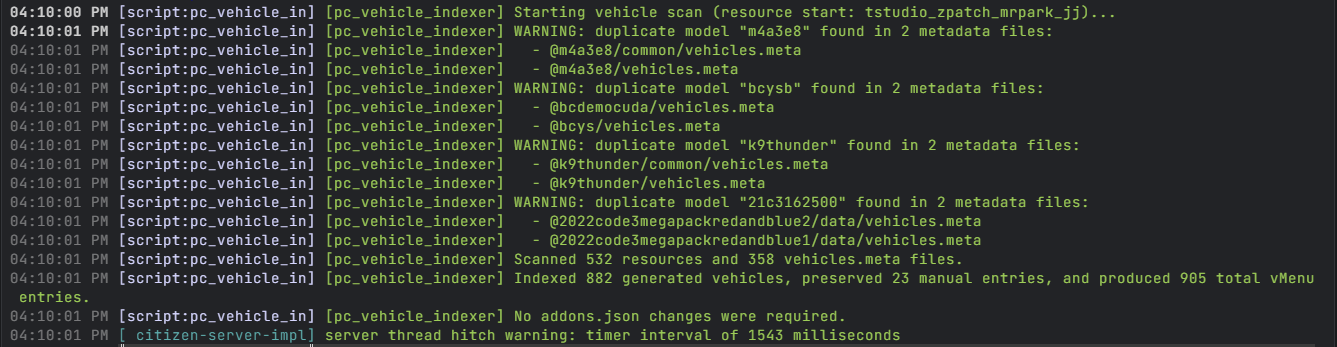
The resource scans your server’s installed vehicle resources, detects supported addon vehicles, generates clean vehicle entries, and automatically adds them to the included vMenu configuration. Whether your server has a handful of custom cars or hundreds of emergency, civilian, commercial, and specialty vehicles, pc_vehicle_indexer makes managing your fleet significantly faster and easier.
Features
- Automatically scans installed FiveM vehicle resources
- Detects addon vehicle spawn names
- Generates vMenu-compatible vehicle entries
- Automatically updates the vehicle configuration
- Supports large vehicle collections and vehicle packs
- Helps reduce duplicate or missing vehicle entries
- Supports manually configured vehicles alongside indexed vehicles
- Organizes vehicles into configurable categories
- Designed for emergency, civilian, commercial, utility, and specialty vehicles
- Detailed server console output for indexing progress and errors
- Configurable exclusions for unwanted vehicles or resources
- Removes the need to manually maintain hundreds of vehicle spawn codes
- Built for both new servers and established communities with large vehicle libraries
How It Works
Once installed, pc_vehicle_indexer scans the configured resources on your FiveM server and identifies available addon vehicles. It then builds the required vehicle entries and places them into the proper vMenu configuration format.
This allows server owners and developers to install new vehicle packs without manually searching through every resource for model names or repeatedly editing their vMenu files.
Required vMenu Version
You must use the version of vMenu included with this product.
pc_vehicle_indexer is specifically designed and configured to work with the bundled version of vMenu. Other public, modified, outdated, or independently downloaded versions of vMenu are not guaranteed to function correctly with the indexer.
Replacing the included version may cause:
- Generated vehicles to not appear
- Vehicle categories to fail
- Configuration files to be ignored
- Duplicate vehicle entries
- Indexing or loading errors
- Compatibility issues with the automated vehicle system
Support cannot be guaranteed when using a different version of vMenu.
Perfect For
- vMenu-based FiveM servers
- Roleplay communities with large vehicle collections
- Emergency service servers
- Servers that frequently add or remove vehicle packs
- Developers managing multiple vehicle resources
- Communities that want a cleaner and more automated setup process
Important Information
- The included version of vMenu is required.
- Vehicle resources must be properly structured and streamed.
- This resource does not repair broken vehicle models, metadata files, or improperly configured vehicle packs.
- Some encrypted or unusually structured resources may require manual configuration.
- Always create a backup of your server files before installing or updating resources.
Spend less time editing configuration files and more time building your server.
Install your vehicles. Start the server. Let pc_vehicle_indexer handle the rest.
Must Be Placed In The Root Resource Folder To Work Properly